Introduction

This tutorial covers migrating workloads from Replicate to Cerebrium in less than 5 minutes. This example migrates the SDXL-Lightning-4step model from ByteDance. Find it on Replicate here. Follow along with the code in the GitHub repo. Start by creating the Cerebrium project.
cerebrium init cog-migration-sdxl
Cerebrium and Replicate both use a setup file: cog.yaml and cerebrium.toml for Replicate and Cerebrium respectively. Based on the cog.yaml, add/change the following in cerebrium.toml
[cerebrium.deployment]
name = "cog-migration-sdxl"
python_version = "3.11"
include = ["./*", "main.py", "cerebrium.toml"]
exclude = ["./example_exclude"]
docker_base_image_url = "nvidia/cuda:12.1.1-cudnn8-runtime-ubuntu22.04"
shell_commands = [
    "curl -o /usr/local/bin/pget -L 'https://github.com/replicate/pget/releases/download/v0.6.2/pget_linux_x86_64' && chmod +x /usr/local/bin/pget"
]

[cerebrium.hardware]
region = "us-east-1"
provider = "aws"
compute = "AMPERE_A10"
cpu = 2
memory = 12.0
gpu_count = 1

[cerebrium.dependencies.pip]
"accelerate" = "latest"
"diffusers" = "latest"
"torch" = "==2.0.1"
"torchvision" = "==0.15.2"
"transformers" = "latest"

[cerebrium.dependencies.apt]
"curl" = "latest"
The configuration above:
  • Uses an Nvidia base image with CUDA libraries (Cuda 12). You can see other images here.
  • Sets hardware based on CPU/GPU requirements. You can see the available options in the GPU guide and CPU and memory guide.
  • Copies the required pip packages
  • Downloads pget (used by Replicate for model weights) via curl and shell commands in cerebrium.toml
The hardware and environment setup now matches. The cog.yaml indicates the endpoint file — in this case, predict.py. Cerebrium’s equivalent entry file is main.py. Start by copying all import statements and constant variables unrelated to Replicate/Cog:
import os
import time
import torch
import subprocess
import numpy as np
from typing import List
from transformers import CLIPImageProcessor
from diffusers import (
    StableDiffusionXLPipeline,
    DDIMScheduler,
    DPMSolverMultistepScheduler,
    EulerAncestralDiscreteScheduler,
    EulerDiscreteScheduler,
    HeunDiscreteScheduler,
    PNDMScheduler,
    KDPM2AncestralDiscreteScheduler,
)
from diffusers.pipelines.stable_diffusion.safety_checker import (
    StableDiffusionSafetyChecker,
)

UNET = "sdxl_lightning_4step_unet.pth"
MODEL_BASE = "stabilityai/stable-diffusion-xl-base-1.0"
UNET_CACHE = "unet-cache"
BASE_CACHE = "checkpoints"
SAFETY_CACHE = "safety-cache"
FEATURE_EXTRACTOR = "feature-extractor"
MODEL_URL = "https://weights.replicate.delivery/default/sdxl-lightning/sdxl-1.0-base-lightning.tar"
SAFETY_URL = "https://weights.replicate.delivery/default/sdxl/safety-1.0.tar"
UNET_URL = "https://weights.replicate.delivery/default/comfy-ui/unet/sdxl_lightning_4step_unet.pth.tar"

class KarrasDPM:
    def from_config(config):
        return DPMSolverMultistepScheduler.from_config(config, use_karras_sigmas=True)


SCHEDULERS = {
    "DDIM": DDIMScheduler,
    "DPMSolverMultistep": DPMSolverMultistepScheduler,
    "HeunDiscrete": HeunDiscreteScheduler,
    "KarrasDPM": KarrasDPM,
    "K_EULER_ANCESTRAL": EulerAncestralDiscreteScheduler,
    "K_EULER": EulerDiscreteScheduler,
    "PNDM": PNDMScheduler,
    "DPM++2MSDE": KDPM2AncestralDiscreteScheduler,
}
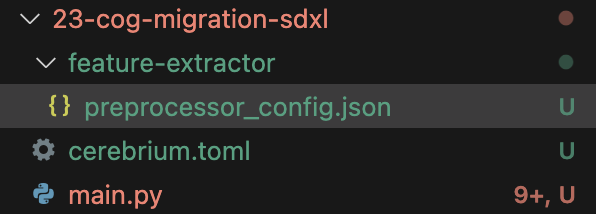
Replicate uses classes, while Cerebrium runs standard Python code and makes each function an endpoint. Remove all self. references throughout the code. The repo contains a “feature-extractor” folder needed in the Cerebrium project. Since it’s small, copy the folder contents directly: Folder Structure Replicate’s setup function runs on each cold start (each new app instantiation). Define it as top-level code below the import statements.
def download_weights(url, dest):
    start = time.time()
    print("downloading url: ", url)
    print("downloading to: ", dest)
    subprocess.check_call(["pget", "-x", url, dest], close_fds=False)
    print("downloading took: ", time.time() - start)

"""Load the model into memory to make running multiple predictions efficient"""
start = time.time()
print("Loading safety checker...")
if not os.path.exists(SAFETY_CACHE):
    download_weights(SAFETY_URL, SAFETY_CACHE)
print("Loading model")
if not os.path.exists(BASE_CACHE):
    download_weights(MODEL_URL, BASE_CACHE)
print("Loading Unet")
if not os.path.exists(UNET_CACHE):
    download_weights(UNET_URL, UNET_CACHE)
self.safety_checker = StableDiffusionSafetyChecker.from_pretrained(
    SAFETY_CACHE, torch_dtype=torch.float16
).to("cuda")
self.feature_extractor = CLIPImageProcessor.from_pretrained(FEATURE_EXTRACTOR)
print("Loading txt2img pipeline...")
self.pipe = StableDiffusionXLPipeline.from_pretrained(
    MODEL_BASE,
    torch_dtype=torch.float16,
    variant="fp16",
    cache_dir=BASE_CACHE,
    local_files_only=True,
).to("cuda")
unet_path = os.path.join(UNET_CACHE, UNET)
self.pipe.unet.load_state_dict(torch.load(unet_path, map_location="cuda"))
print("setup took: ", time.time() - start)
The code downloads model weights if they don’t exist and instantiates the models. To persist files/data on Cerebrium, store them at /persistent-storage. Update the paths:
UNET_CACHE = "/persistent-storage/unet-cache"
BASE_CACHE = "/persistent-storage/checkpoints"
SAFETY_CACHE = "/persistent-storage/safety-cache"
Copy the remaining functions, run_safety_checker() and predict(). In Cerebrium, function parameters map directly to the expected JSON request data:
def run_safety_checker(image):
    safety_checker_input = feature_extractor(image, return_tensors="pt").to(
        "cuda"
    )
    np_image = [np.array(val) for val in image]
    image, has_nsfw_concept = safety_checker(
        images=np_image,
        clip_input=safety_checker_input.pixel_values.to(torch.float16),
    )
    return image, has_nsfw_concept

def predict(
    prompt: str = "A superhero smiling",
    negative_prompt: str = "worst quality, low quality",
    width: int = 1024,
    height: int = 1024,
    num_outputs: int = 1,
    scheduler: str = "K_EULER",
    num_inference_steps: int = 4,
    guidance_scale: float = 0,
    seed: int = None,
    disable_safety_checker: bool = False,
):
    """Run a single prediction on the model"""
    global pipe
    if seed is None:
        seed = int.from_bytes(os.urandom(4), "big")
    print(f"Using seed: {seed}")
    generator = torch.Generator("cuda").manual_seed(seed)

    # OOMs can leave vae in bad state
    if pipe.vae.dtype == torch.float32:
        pipe.vae.to(dtype=torch.float16)

    sdxl_kwargs = {}
    print(f"Prompt: {prompt}")
    sdxl_kwargs["width"] = width
    sdxl_kwargs["height"] = height

    pipe.scheduler = SCHEDULERS[scheduler].from_config(
        pipe.scheduler.config, timestep_spacing="trailing"
    )

    common_args = {
        "prompt": [prompt] * num_outputs,
        "negative_prompt": [negative_prompt] * num_outputs,
        "guidance_scale": guidance_scale,
        "generator": generator,
        "num_inference_steps": num_inference_steps,
    }

    output = pipe(**common_args, **sdxl_kwargs)

    if not disable_safety_checker:
        _, has_nsfw_content = run_safety_checker(output.images)


        output_paths = []
        for i, image in enumerate(output.images):
            if not disable_safety_checker:
                if has_nsfw_content[i]:
                    print(f"NSFW content detected in image {i}")
                    continue
            output_path = f"/tmp/out-{i}.png"
            image.save(output_path)
            output_paths.append(Path(output_path))

        if len(output_paths) == 0:
            raise Exception(
                "NSFW content detected. Try running it again, or try a different prompt."
            )

        return output_paths
The above returns a path to the generated images, To return base64-encoded images for instant rendering Alternatively, upload images to a storage bucket.
from io import BytesIO
import base64

encoded_images = []
    for i, image in enumerate(output.images):
        if not disable_safety_checker:
            if has_nsfw_content[i]:
                print(f"NSFW content detected in image {i}")
                continue
        buffered = BytesIO()
        image.save(buffered, format="PNG")
        img_b64 = base64.b64encode(buffered.getvalue()).decode("utf-8")
        encoded_images.append(img_b64)

    if len(encoded_images) == 0:
        raise Exception(
            "NSFW content detected. Try running it again, or try a different prompt."
        )

    return encoded_images
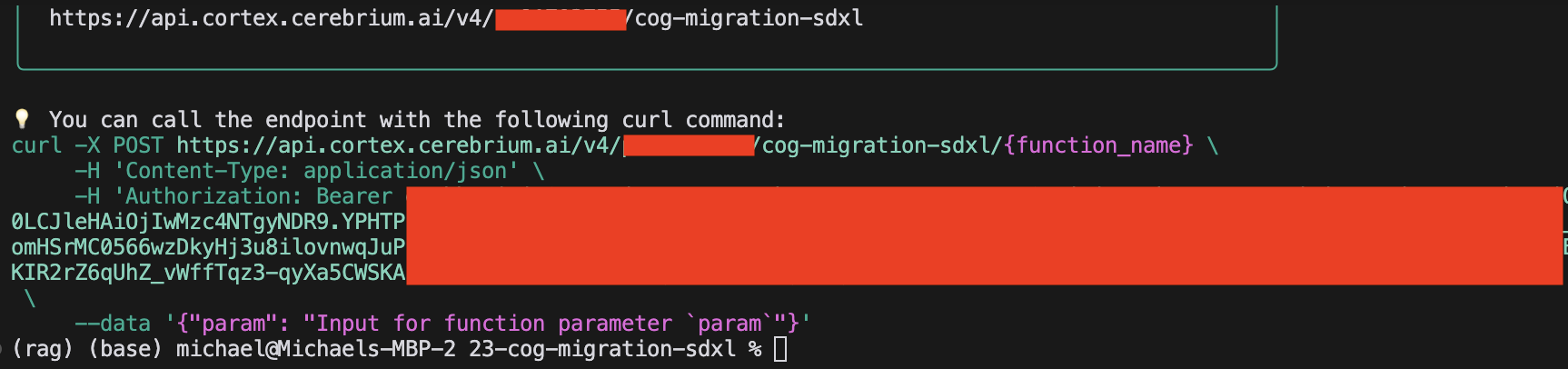
Run cerebrium deploy. The app builds in under 90 seconds. It should output the curl statement to run your app: Curl Request Replace the end of the URL with /predict (the target function) and send the required JSON data. Example result:
{
    "run_id": "c6797f2e-333a-9e89-bafa-4dd0f4fbe22a",
    "result": ["iVBORw0KGgoAAAANSUhEUgAABAAAAAQACAIAAADwf7zUAA...."],
    "run_time_ms": 43623.4176158905
}
Read more about Cerebrium functionality: