This tutorial builds Cal-vin, an executive assistant that manages calendar appointments (via Cal.com) with employees, customers, partners, and friends. It uses the LangChain SDK for agent creation and the LangSmith platform for monitoring scheduling activities and identifying failure points, deployed on Cerebrium for seamless scaling. You can find the final version of the code here

Concepts

This app requires calendar interaction based on user instructions — an ideal use case for an agent with function (tool) calling capabilities. LangChain provides extensive agent support, and its companion tool LangSmith makes monitoring integration straightforward. A tool refers to any framework, utility, or system with defined functionality for specific use cases, such as searching Google or retrieving credit card transactions. Key LangChain concepts: ChatModel.bind_tools(): Attaches tool definitions to model calls. While providers have different tool definition formats, LangChain provides a standard interface for versatility. Accepts tool definitions as dictionaries, Pydantic classes, LangChain tools, or functions, telling the LLM how to use each tool.
@tool
def exponentiate(x: float, y: float) -> float:
    """Raise 'x' to the 'y'."""
    return x**y
AIMessage.tool_calls: An attribute on AIMessage that provides easy access to model-initiated tool calls, specifying invocations in the bind_tools format:
# -> AIMessage(
# 	  content=...,
# 	  additional_kwargs={...},
# 	  tool_calls=[{'name': 'exponentiate', 'args': {'y': 2.743, 'x': 5.0}, 'id': '54c166b2-f81a-481a-9289-eea68fc84e4f'}]
# 	  response_metadata={...},
# 	  id='...'
#   )
create_tool_calling_agent(): Unifies the above concepts to work across different provider formats, enabling easy model switching.
agent = create_tool_calling_agent(llm, tools, prompt)
agent_executor = AgentExecutor(agent=agent, tools=tools, verbose=True)

agent_executor.invoke({"input": "what's 3 plus 5 raised to the 2.743. also what's 17.24 - 918.1241", })

Setup Cal.com

Cal.com provides the calendar management foundation. Create an account here if needed. Cal serves as the source of truth — updates to time zones or working hours automatically reflect in the assistant’s responses. After creating your account:
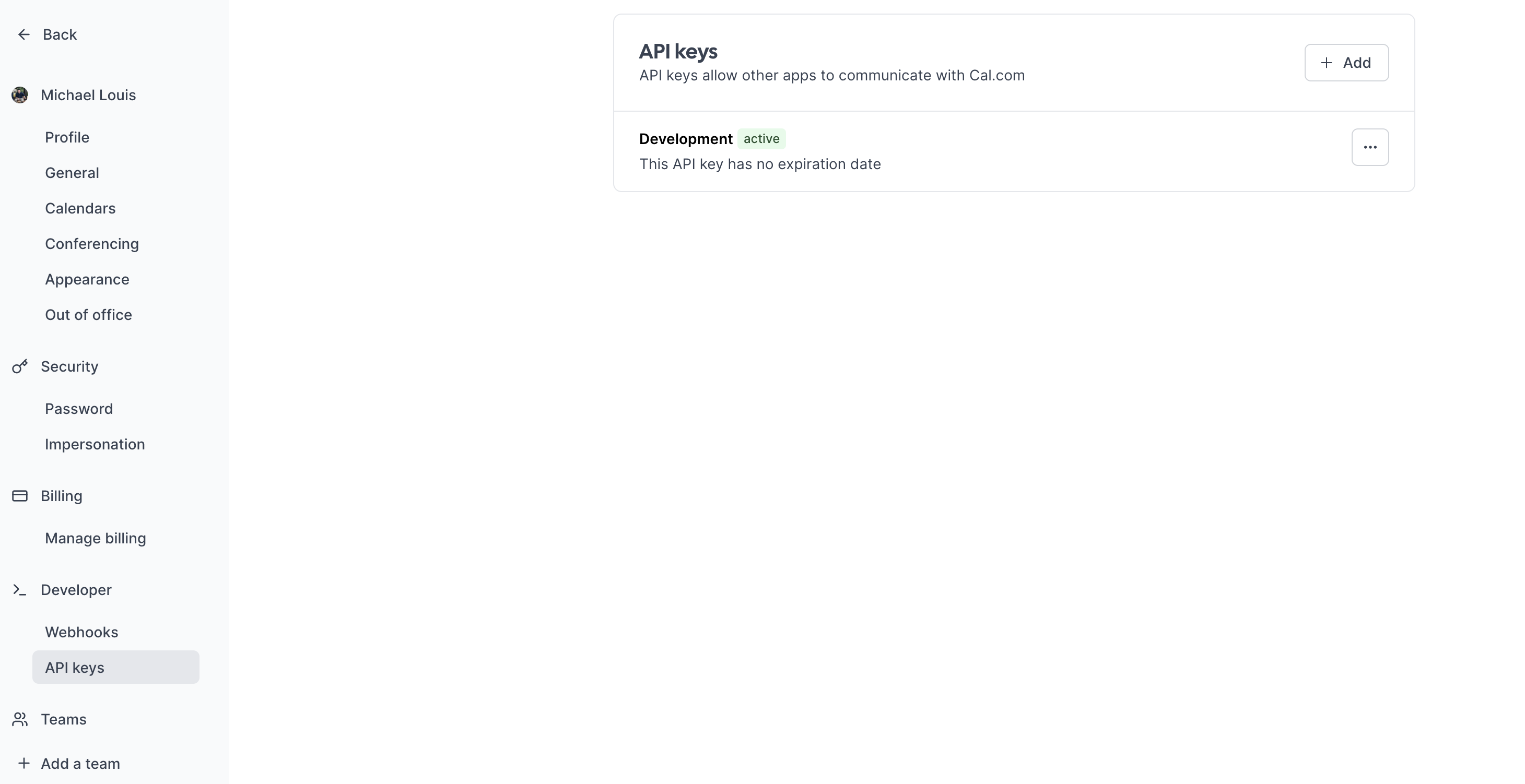
  1. Navigate to “API keys” in the sidebar
  2. Create an API key without expiration
  3. Test the setup with a CURL request (replace these variables):
    • Username
    • API key
    • dateFrom and dateTo
Cal.com API Keys
curl --location 'https://api.cal.com/v1/availability?apiKey=cal_live_xxxxxxxxxxxxxx&dateFrom=2024-04-15T00%3A00%3A00.000Z&dateTo=2024-04-22T00%3A00%3A00.000Z&username=michael-louis-xxxx'
You should get a response similar to the following:
{
    "busy": [
        {
            "start": "2024-04-15T13:00:00.000Z",
            "end": "2024-04-15T13:30:00.000Z"
        },
        {
            "start": "2024-04-22T13:00:00.000Z",
            "end": "2024-04-22T13:30:00.000Z"
        },
        {
            "start": "2024-04-29T13:00:00.000Z",
            "end": "2024-04-29T13:30:00.000Z"
        },
	   ....
    ],
    "timeZone": "America/New_York",
    "dateRanges": [
        {
            "start": "2024-04-15T13:45:00.000Z",
            "end": "2024-04-15T16:00:00.000Z"
        },
        {
            "start": "2024-04-15T16:45:00.000Z",
            "end": "2024-04-15T19:45:00.000Z"
        },
	    ....
        {
            "start": "2024-04-19T18:45:00.000Z",
            "end": "2024-04-19T21:00:00.000Z"
        }
    ],
    "oooExcludedDateRanges": [

    ],
    "workingHours": [
        {
            "days": [
                1,
                2,
                3,
                4,
                5
            ],
            "startTime": 780,
            "endTime": 1260,
            "userId": xxxx
        }
    ],
    "dateOverrides": [],
    "currentSeats": null,
    "datesOutOfOffice": {}
}
The API key is now confirmed working and pulling calendar information. The API calls used later in this tutorial are:
  • /availability: Get your availability
  • /bookings: Book a slot

Cerebrium setup

Set up Cerebrium:
  1. Sign up here
  2. Follow installation docs here
  3. Create a starter project:
    cerebrium init agent-tool-calling
    
    This creates:
    • main.py: Entrypoint file
    • cerebrium.toml: Build and environment configuration
Add these pip packages to your cerebrium.toml:
[cerebrium.dependencies.pip]
pydantic = "latest"
langchain = "latest"
pytz = "latest" ##this is used for timezones
openai = "latest"
langchain_openai = "latest"
Set up API keys:
  1. OpenAI GPT-3.5:
    • Sign up at OpenAI
    • Create API key here (format: sk_xxxxx)
  2. Add secrets in Cerebrium dashboard:
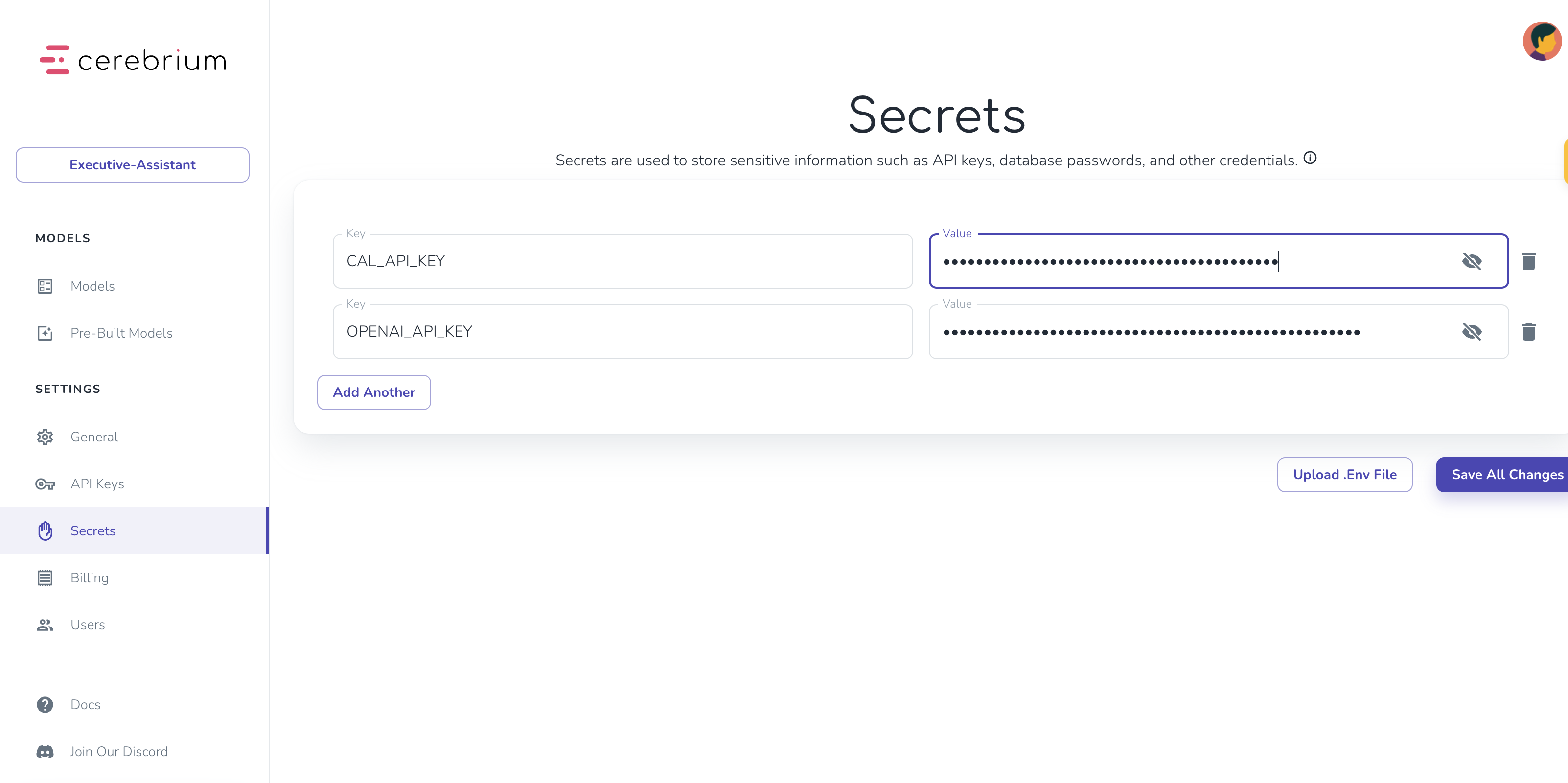
    • Navigate to “Secrets”
    • Add keys:
      • CAL_API_KEY: Your Cal.com API key
      • OPENAI_API_KEY: Your OpenAI API key
Cerebrium Secrets Dashboard

Agent Setup

Create two tool functions in main.py for calendar management:
  1. Get availability tool
  2. Book slot tool
The Cal.com API provides:
  • Busy time slots
  • Working hours per day
Below is the code to achieve this:

from langchain_core.tools import tool
import os
import requests
from cal import find_available_slots

@tool
def get_availability(fromDate: str, toDate: str) -> float:
    """Get my calendar availability using the 'fromDate' and 'toDate' variables in the date format '%Y-%m-%dT%H:%M:%S.%fZ'"""

    url = "https://api.cal.com/v1/availability"
    params = {
        "apiKey": os.environ.get("CAL_API_KEY"),
        "username": "xxxxx",
        "dateFrom": fromDate,
        "dateTo": toDate
    }
    response = requests.get(url, params=params)
    if response.status_code == 200:
        availability_data = response.json()
        available_slots = find_available_slots(availability_data, fromDate, toDate)
        return available_slots
    else:
        return {}
The code above:
  1. Uses @tool decorator to identify functions as LangChain tools
  2. Includes docstrings explaining functionality and required inputs
  3. Uses find_available_slots helper function to format Cal.com API responses into readable time slots ‍
The book_slot tool follows a similar pattern. It books a slot based on the selected time/day. Get the eventTypeId from the dashboard by selecting an event and grabbing the ID from the URL.
@tool
def book_slot(datetime: str, name: str, email: str, title: str, description: str) -> float:
    """Book a meeting on my calendar at the requested date and time using the 'datetime' variable. Get a description about what the meeting is about and make a title for it"""
    url = "https://api.cal.com/v1/bookings"
    params = {
        "apiKey": os.environ.get("CAL_API_KEY"),
        "username": "xxxx",
        "eventTypeId": "xxx",
        "start": datetime,
        "responses": {
            "name": name,
            "email": email,
            "guests": [],
            "metadata": {},
            "location": {
              "value": "inPerson",
              "optionValue": ""
            }
        },
        "timeZone": "America/New York",
        "language": "en",
        "status": "PENDING",
        "title": title,
        "description": description,
    }
    response = requests.post(url, params=params)
    if response.status_code == 200:
        booking_data = response.json()
        return booking_data
    else:
        print('error')
        print(response)
        return {}
With both tools created, set up the agent in main.py:
from langchain_core.prompts import ChatPromptTemplate, MessagesPlaceholder
from langchain_core.tools import tool
from langchain.agents import create_tool_calling_agent, AgentExecutor
from langchain_openai import ChatOpenAI

prompt = ChatPromptTemplate.from_messages([
    ("system", "you're a helpful assistant managing the calendar of Michael Louis. You need to book appointments for a user based on available capacity and their preference. You need to find out if the user is: From Michaels team, a customer of Cerebrium or a friend or entrepreneur. If the person is from his team, book a morning slot. If its a potential customer for Cerebrium, book an afternoon slot. If its a friend or entrepreneur needing help or advice, book a night time slot. If none of these are available, book the earliest slot. Do not book a slot without asking the user what their preferred time is. Find out from the user, their name and email address."),
    MessagesPlaceholder(variable_name="chat_history"),
    ("human", "{input}"),
    MessagesPlaceholder(variable_name="agent_scratchpad"),
])

tools = [get_availability, book_slot]


llm = ChatOpenAI(model="gpt-3.5-turbo-0125", temperature=0, api_key=os.environ.get("OPENAI_API_KEY"))
agent = create_tool_calling_agent(llm, tools, prompt)
agent_executor = AgentExecutor(agent=agent, tools=tools, verbose=True)
The agent executor consists of:
  • The prompt template:
    • Defines the agent’s role, goals, and situational behavior. More precise instructions yield better results.
    • Chat History stores previous messages for conversation context.
    • Input receives new input from the end user.
  • The GPT-3.5 model serves as the LLM. Swap to Anthropic or any other provider by replacing this one line — LangChain makes this seamless.
  • Finally, these components combine with the tools to create an agent executor.

Setup Chatbot

The above code only handles a single question. A multi-turn conversation is needed to find a mutually suitable time. LangChain’s RunnableWithMessageHistory() adds tool calling capabilities and message memory. It stores previous replies in the chat_history variable (from the prompt template) and ties them to a session identifier, so the API remembers information per user/session:
from langchain.memory import ChatMessageHistory
from langchain_core.runnables.history import RunnableWithMessageHistory

demo_ephemeral_chat_history_for_chain = ChatMessageHistory()
conversational_agent_executor = RunnableWithMessageHistory(
    agent_executor,
    lambda session_id: demo_ephemeral_chat_history_for_chain,
    input_messages_key="input",
    output_messages_key="output",
    history_messages_key="chat_history",
)
Run a local test to verify everything works:
class Item(BaseModel):
    prompt: str
    session_id: str

def predict(item, run_id, logger):
    item = Item(**item)

    output = conversational_agent_executor.invoke(
        {
            "input": user_input,
        },
        {"configurable": {"session_id": item.session_id}},
    )

    return {"result": output} # return your results

if __name__ == "__main__":
    while True:
        user_input = input("Enter the input (or type 'exit' to stop): ")
        if user_input.lower() == 'exit':
            break
        result = predict({"prompt": user_input, "session_id": "12345"}, "test", logger=None)
        print(result)
This code:
  • Defines a Pydantic object specifying the expected API parameters — user prompt and session ID.
  • The predict function (Cerebrium’s API entry point) passes the prompt and session ID to the agent and returns results. ‍
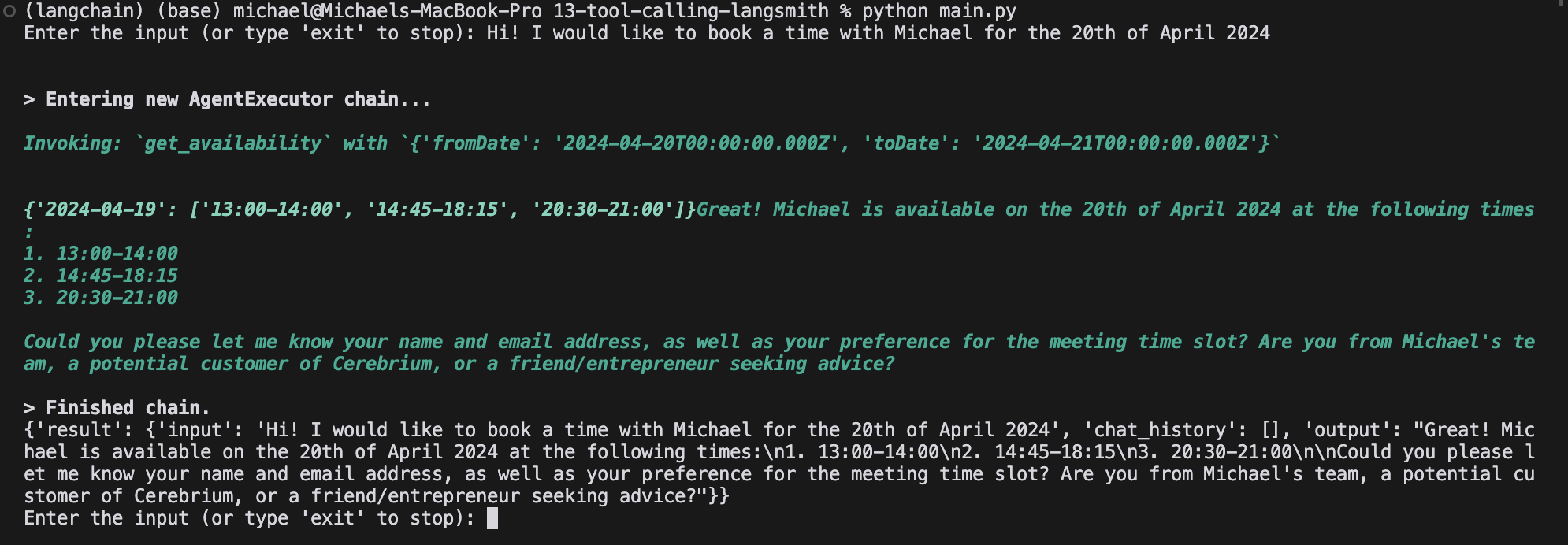
Install pip dependencies locally: pip install pydantic langchain pytz openai langchain_openai langchain-community, then run python main.py. Replace secrets with actual values when running locally. Output looks similar to: Langchain Agent Continuing the conversation eventually results in a booked slot.
Integrate Langsmith

Production monitoring is crucial for agent applications with nondeterministic workflows. LangSmith, a LangChain tool for logging, debugging, and monitoring, tracks performance and surfaces edge cases. Learn more here. Set up LangSmith monitoring:
  1. Add LangSmith to cerebrium.toml dependencies
  2. Create a free LangSmith account here
  3. Generate API key (click gear icon in bottom left)
Set the following environment variables at the top of main.py. Add the API key to Cerebrium secrets
import os
os.environ['LANGCHAIN_TRACING_V2']="true"
os.environ['LANGCHAIN_API_KEY']=os.environ.get("LANGCHAIN_API_KEY")
Enable tracing by adding the @traceable decorator to functions. LangSmith automatically tracks tool invocations and OpenAI responses through function traversal. Add the decorator to the predict function and any independently instantiated functions:
from langsmith import traceable

@traceable
def predict(item, run_id, logger):
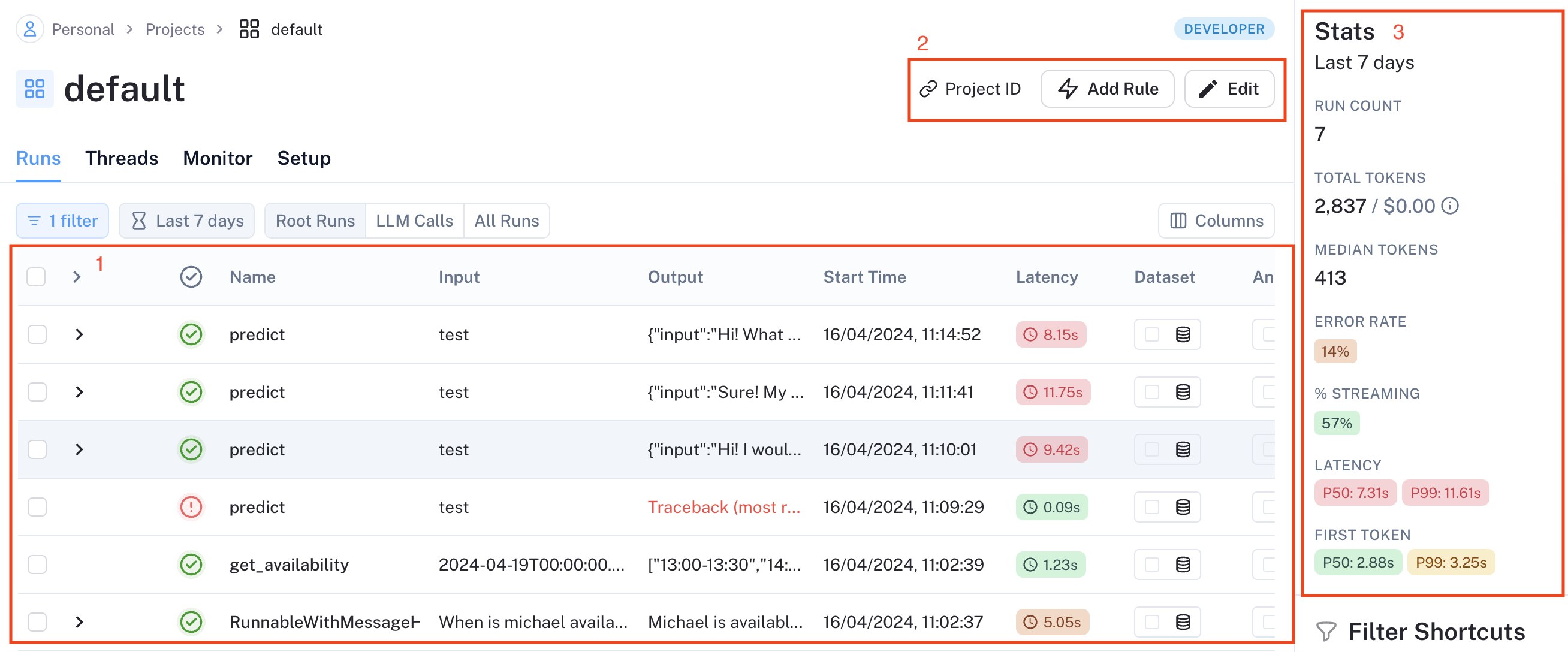
LangSmith is now set up. Run python main.py and test booking an appointment. After a successful test run, data populates in LangSmith: LangSmith Runs Dashboard The Runs tab shows all runs (invocations/API requests). In 1 above, the function name appears, with input set to the Cerebrium RunID (set to “test”. The input and total latency of the run are also visible. LangSmith supports various data automations:
  • Data annotation for positive/negative case labeling
  • Dataset creation for model training
  • Online LLM-based evaluation (rudeness, topic analysis)
  • Webhook endpoint triggers
  • Additional features
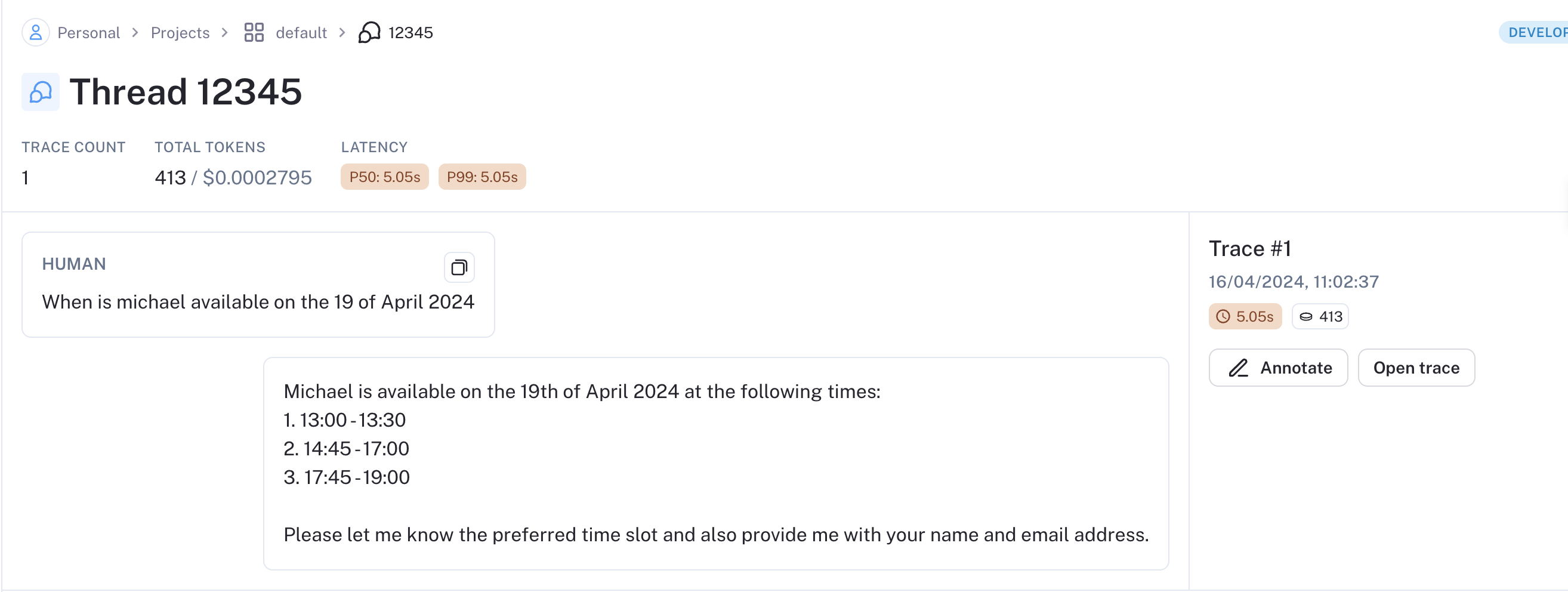
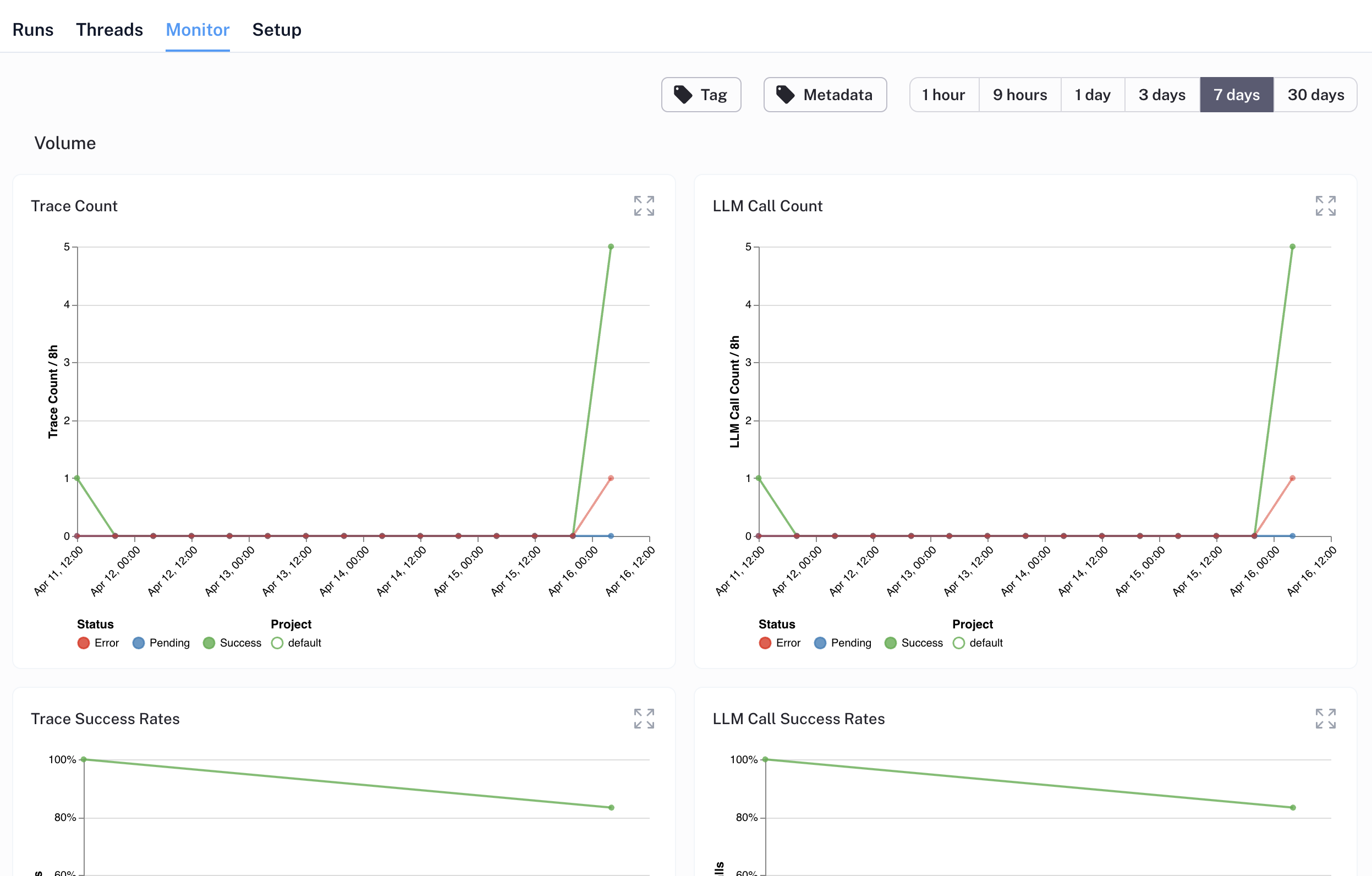
Set automations by clicking the “Add rule” button above (2) and specifying conditions. Rule options include a filter, sampling rate, and action. Section 3 shows overall project metrics: run count, error rate, latency, etc. LangSmith Threads provide clean conversation tracking between agents and users. Track conversation evolution and investigate anomalies through trace analysis. Each thread links to its session ID. LangSmith Threads The Monitor tab shows agent performance metrics: trace count, LLM call success rate, time to first token, and more. LangSmith Performance Monitoring LangSmith offers straightforward integration with extensive functionality. Beyond the basics covered here, it supports the full application feedback loop: data collection/annotation → monitoring → iteration.

Deploy to Cerebrium

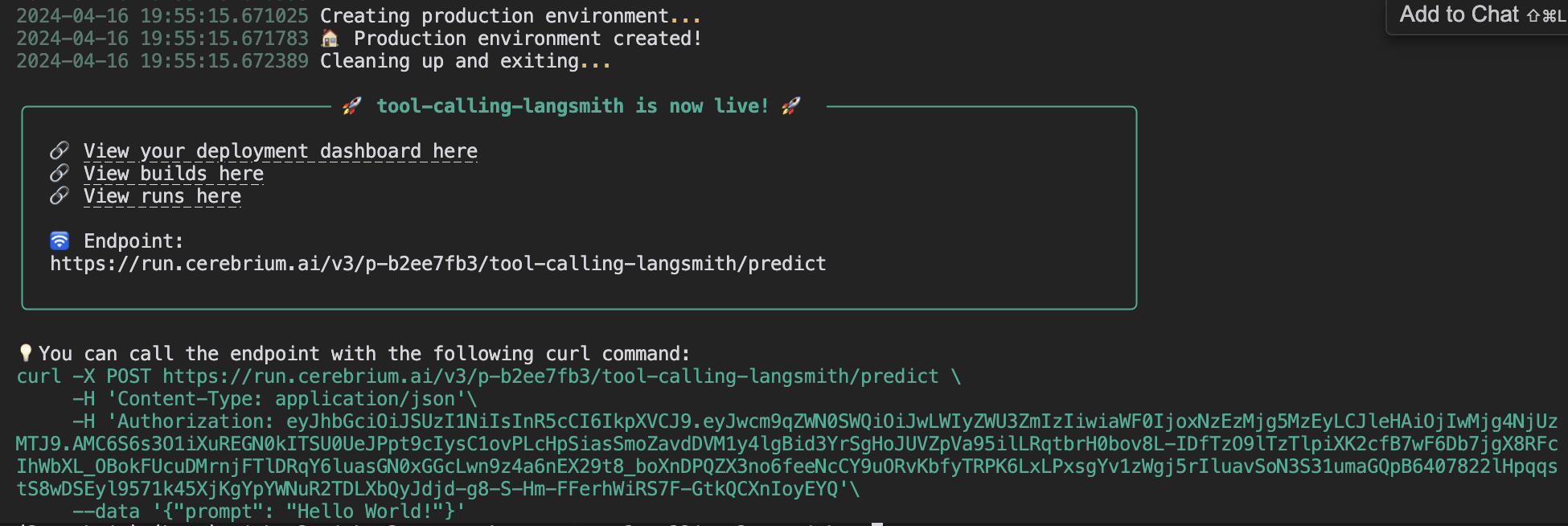
Deploy to Cerebrium by running cerebrium deploy. Delete the name == "main" block first (used only for local testing). After successful deployment: Cerebrium Deployment The API endpoint is now live. The agent remembers conversations as long as the session ID remains the same. Cerebrium automatically scales the application based on demand, with pay-per-use compute.
{
    "run_id": "UHCJ_GkTKh451R_nKUd3bDxp8UJrcNoPWfEZ3AYiqdY85UQkZ6S1vg==",
    "status_code": 200,
    "result": {
        "result": {
            "input": "Hi! I would like to book a time with Michael the 18th of April 2024.",
            "chat_history": [],
            "output": "Michael is available on the 18th of April 2024 at the following times:\n1. 13:00 - 13:30\n2. 14:45 - 17:00\n3. 17:45 - 19:00\n\nPlease let me know your preferred time slot. Are you from Michael's team, a potential customer of Cerebrium, or a friend/entrepreneur seeking advice?"
        }
    },
    "run_time_ms": 6728.828907012939,
    "process_time_ms": 6730.178117752075
}
You can find the final version of the code here.

Future Enhancements

Consider implementing:
  1. Response streaming for seamless user experience
  2. Email integration for context-aware scheduling when Claire is tagged
  3. Voice capabilities for phone-based scheduling

Conclusion

LangChain, LangSmith, and Cerebrium together enable scalable agent deployment. LangChain handles LLM orchestration, tooling, and memory management. LangSmith provides production monitoring and edge case identification. Cerebrium offers pay-as-you-go scaling across hundreds or thousands of CPU/GPUs. Tag @cerebriumai in extensions to the code repository to share with the community.