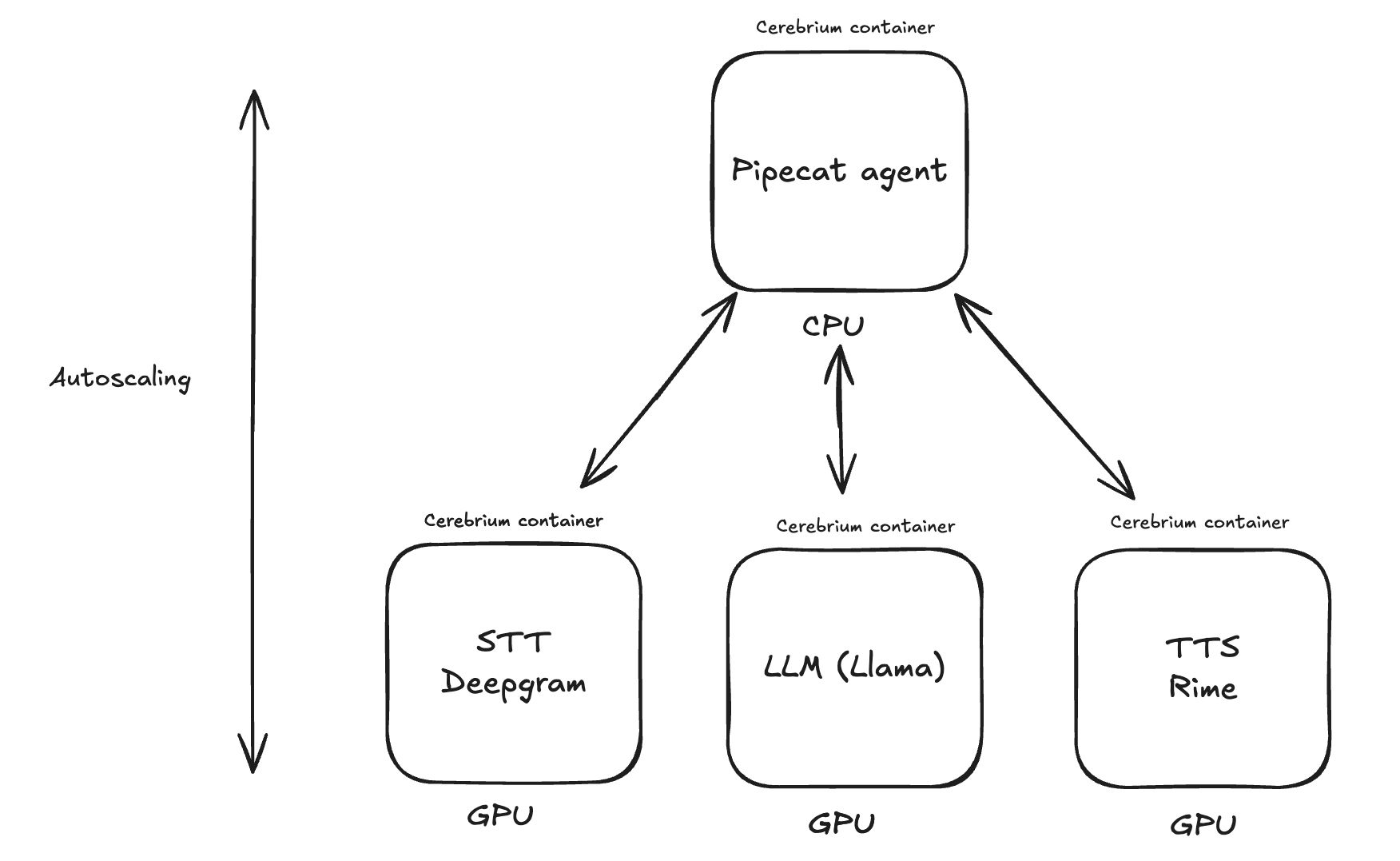
This tutorial creates a real-time voice agent that responds to queries via speech in ~500ms. The implementation supports swapping in any Large Language Model (LLM) or Text-to-Speech (TTS) model, making it ideal for voice-based use cases like customer support bots and receptionists. The app uses PipeCat, a framework that handles component integration, user interruptions, and audio data processing. The example joins a meeting room with a voice agent using Daily (PipeCat’s creators) and deploys on Cerebrium for scaling. The application has 3–4 parts:
  • A Pipecat agent that acts as the orchestrator
  • A Deepgram TTS/STT service (requires a Deepgram Enterprise account)
  • A self-hosted LLM using the vLLM framework
Low latency is achieved because each service is hosted within Cerebrium — communication across containers is less than 10ms with no network latency overhead. Realtime Voice Agents You can find the final version of the code here Create a Cerebrium account by signing up here and follow the installation docs.

Deepgram deployment

See the Partner Services page to deploy a Deepgram service on Cerebrium.
You need a Deepgram Enterprise License to do deploy Deegram on Cerebrium else you must use their API endpoint below.

LLM Deployment

The LLM is an OpenAI-compatible Llama-3 endpoint using the vLLM framework. For low TTFT, a quantized version is used (RedHatAI/Meta-Llama-3.1-8B-Instruct-quantized.w8a8). Run cerebrium init llama-llm and add the following to cerebrium.toml:
[cerebrium.deployment]
name = "llama-llm"
python_version = "3.11"
docker_base_image_url = "debian:bookworm-slim"
include = ["./*", "main.py", "cerebrium.toml"]
exclude = [".*"]

[cerebrium.hardware]
cpu = 4
memory = 12.0
compute = "ADA_L40"

[cerebrium.scaling]
min_replicas = 1
max_replicas = 5
cooldown = 60

[cerebrium.dependencies.pip]
vllm = "latest"
pydantic = "latest"
Add the following code to main.py — this uses the vLLM framework and makes it OpenAI compatible:
import os
import time
import json

from huggingface_hub import login
from pydantic import BaseModel
from vllm import SamplingParams, AsyncLLMEngine
from vllm.engine.arg_utils import AsyncEngineArgs

login(token=os.environ.get("HF_TOKEN"))

engine_args = AsyncEngineArgs(
    model="RedHatAI/Meta-Llama-3.1-8B-Instruct-quantized.w8a8",
    gpu_memory_utilization=0.9,
    max_model_len=8192,
)
engine = AsyncLLMEngine.from_engine_args(engine_args)


class Message(BaseModel):
    role: str
    content: str


def format_chat_prompt(messages: list) -> str:
    formatted_messages = []
    for msg in messages:
        msg_obj = Message(**msg)
        formatted_messages.append(
            f"<|start_header_id|>{msg_obj.role}<|end_header_id|>\n{msg_obj.content}<|eot_id|>"
        )
    return "<|begin_of_text|>" + "".join(formatted_messages) + "<|start_header_id|>assistant<|end_header_id|>"


async def run(
    messages: list,
    model: str,
    run_id: str,
    stream: bool = True,
    temperature: float = 0.8,
    top_p: float = 0.95,
    max_tokens: int = 256,
    stream_options: dict = None,
):
    # Format your prompt for llama-friendly usage:
    prompt = format_chat_prompt(messages)

    sampling_params = SamplingParams(temperature=temperature, top_p=top_p, max_tokens=max_tokens)
    results_generator = engine.generate(prompt, sampling_params, run_id)

    previous_text = ""
    first_chunk = True

    async for output in results_generator:
        prompt_output = output.outputs
        new_text = prompt_output[0].text[len(previous_text) :]
        previous_text = prompt_output[0].text

        # Construct OpenAI-compatible chunk
        chunk = {
            "id": run_id,
            "object": "chat.completion.chunk",
            "created": int(time.time()),
            "model": model,
            "choices": [
                {
                    "index": 0,
                    "delta": {},
                    "finish_reason": None,
                }
            ],
        }

        # Include the role in the first chunk
        if first_chunk:
            chunk["choices"][0]["delta"]["role"] = "assistant"
            first_chunk = False

        # Add new text to the delta if any
        if new_text:
            chunk["choices"][0]["delta"]["content"] = new_text

        # Capture a finish reason if it's provided
        finish_reason = prompt_output[0].finish_reason or None
        if finish_reason and finish_reason != "none":
            chunk["choices"][0]["finish_reason"] = finish_reason

        yield f"data: {json.dumps(chunk)}\n\n"

    # Send the final [DONE] message
    yield "data: [DONE]\n\n"
Add the HuggingFace token to Secrets on Cerebrium as HF_TOKEN. Run cerebrium deploy to make it live. The deployment URL appears in the dashboard and is used in the next step. Adjust the GPU hardware and replica_concurrency in cerebrium.toml to control how many concurrent calls the LLM handles.

Pipecat setup

Run the following command to create the pipecat-agent: cerebrium init pipecat-agent. The Pipecat framework orchestrates the services to create a voice agent. Add the following pip packages to cerebrium.toml:
[cerebrium.deployment]
# This file was automatically generated by Cerebrium as a starting point for your project.
# You can edit it as you wish.
# If you would like to learn more about your Cerebrium config, please visit https://docs.cerebrium.ai/environments/config-files#config-file-example

[cerebrium.deployment]
name = "pipecat-agent"
python_version = "3.11"
include = ["./*", "main.py", "cerebrium.toml"]
exclude = ["./example_exclude"]

[cerebrium.hardware]
region = "us-east-1"
provider = "aws"
compute = "CPU"
cpu = 6
memory = 12.0

[cerebrium.scaling]
min_replicas = 1 # Note: This incurs a constant cost since at least one instance is always running.
max_replicas = 2
cooldown = 180

[cerebrium.dependencies.pip]
torch = ">=2.0.0"
"pipecat-ai[silero, daily, openai, deepgram, cartesia]" = "==0.0.67"
aiohttp = ">=3.9.4"
torchaudio = ">=2.3.0"
channels = ">=4.0.0"
requests = "==2.32.2"
dotenv = "latest"
Add the following code to main.py:
import asyncio
import os
import subprocess
import sys
import time
from multiprocessing import Process

import aiohttp
import requests
from loguru import logger
from pipecat.frames.frames import LLMMessagesFrame, EndFrame
from pipecat.pipeline.pipeline import Pipeline
from pipecat.pipeline.runner import PipelineRunner

from pipecat.pipeline.task import PipelineParams, PipelineTask
from pipecat.processors.aggregators.llm_response import (
    LLMAssistantResponseAggregator,
    LLMUserResponseAggregator,
)
from pipecat.services.deepgram.stt import DeepgramSTTService
from pipecat.services.cartesia.tts import CartesiaTTSService
from deepgram import LiveOptions
from pipecat.services.rime.tts import RimeHttpTTSService, RimeTTSService, Language
from pipecat.services.openai import OpenAILLMService
from pipecat.transports.services.daily import DailyParams, DailyTransport
from pipecat.audio.vad.silero import SileroVADAnalyzer
from pipecat.audio.vad.vad_analyzer import VADParams

from helpers import (
    CustomDeepgramSTTService,
)

from dotenv import load_dotenv

load_dotenv()

logger.remove(0)
logger.add(sys.stderr, level="DEBUG")

deepgram_voice: str = "aura-asteria-en"

async def main(room_url: str, token: str):
    async with aiohttp.ClientSession() as session:
        transport = DailyTransport(
            room_url,
            token,
            "Respond bot",
            DailyParams(
                audio_out_enabled=True,
                audio_in_enabled=True,
                transcription_enabled=False,
                vad_enabled=True,
                vad_analyzer=SileroVADAnalyzer(params=VADParams(stop_secs=0.15)),
                vad_audio_passthrough=True,
            ),
        )

        stt = CustomDeepgramSTTService(
            api_key=os.environ.get("DEEPGRAM_API_KEY"),
            websocket_url="ws://api.aws/v4/p-xxxxxxxx/deepgram/v1/listen",
            live_options=LiveOptions(
                model="nova-2-general",
                language="en-US",
                smart_format=True,
                vad_events=True
            )
        )

        tts = CartesiaTTSService(
            api_key=os.environ.get("CARTESIA_API_KEY"),
            voice_id='97f4b8fb-f2fe-444b-bb9a-c109783a857a',

        )

        llm = OpenAILLMService(
            name="LLM",
            model="RedHatAI/Meta-Llama-3.1-8B-Instruct-quantized.w8a8",
            base_url="http://api.aws/v4/p-xxxxxxxx/llama-llm/run"
        )

        messages = [
            {
                "role": "system",
                "content": "You are a fast, low-latency chatbot. Your goal is to demonstrate voice-driven AI capabilities at human-like speeds. The technology powering you is Daily for transport, Cerebrium for serverless infrastructure, Llama 3 (8-B version) LLM, and Deepgram for speech-to-text and text-to-speech. You are hosted on the east coast of the United States. Respond to what the user said in a creative and helpful way, but keep responses short and legible. Ensure responses contain only words. Check again that you have not included special characters other than '?' or '!'.",
            },
        ]

        tma_in = LLMUserResponseAggregator(messages)
        tma_out = LLMAssistantResponseAggregator(messages)

        pipeline = Pipeline(
            [
                transport.input(),  # Transport user input
                stt,  # Speech-to-text
                tma_in,  # User responses
                llm,  # LLM
                tts,  # TTS
                transport.output(),  # Transport bot output
                tma_out,  # Assistant spoken responses
            ]
        )

        task = PipelineTask(
            pipeline,
            params=PipelineParams(
                allow_interruptions=True,
                enable_metrics=True
            ),
        )

        # When the first participant joins, the bot should introduce itself.
        @transport.event_handler("on_first_participant_joined")
        async def on_first_participant_joined(transport, participant):
            # Kick off the conversation.
            time.sleep(1.5)
            messages.append(
                {
                    "role": "system",
                    "content": "Introduce yourself by saying 'hello, I'm FastBot, how can I help you today?'",
                }
            )
            await task.queue_frame(LLMMessagesFrame(messages))

        # When the participant leaves, we exit the bot.
        @transport.event_handler("on_participant_left")
        async def on_participant_left(transport, participant, reason):
            await task.queue_frame(EndFrame())

        # If the call is ended make sure we quit as well.
        @transport.event_handler("on_call_state_updated")
        async def on_call_state_updated(transport, state):
            if state == "left":
                await task.queue_frame(EndFrame())

        runner = PipelineRunner()

        await runner.run(task)
        await session.close()


async def start_bot(room_url: str, token: str = None):

    try:
        await main(room_url, token)
    except Exception as e:
        logger.error(f"Exception in main: {e}")
        sys.exit(1)  # Exit with a non-zero status code

    return {"message": "session finished"}


def create_room():
    url = "https://api.daily.co/v1/rooms/"
    headers = {
        "Content-Type": "application/json",
        "Authorization": f"Bearer {os.environ.get('DAILY_TOKEN')}",
    }
    data = {
        "properties": {
            "exp": int(time.time()) + 60 * 5,  ##5 mins
            "eject_at_room_exp": True,
        }
    }

    response = requests.post(url, headers=headers, json=data)
    if response.status_code == 200:
        room_info = response.json()
        token = create_token(room_info["name"])
        if token and "token" in token:
            room_info["token"] = token["token"]
        else:
            logger.error("Failed to create token")
            return {
                "message": "There was an error creating your room",
                "status_code": 500,
            }
        return room_info
    else:
        data = response.json()
        if data.get("error") == "invalid-request-error" and "rooms reached" in data.get(
            "info", ""
        ):
            logger.error(
                "We are currently at capacity for this demo. Please try again later."
            )
            return {
                "message": "We are currently at capacity for this demo. Please try again later.",
                "status_code": 429,
            }
        logger.error(f"Failed to create room: {response.status_code}")
        return {"message": "There was an error creating your room", "status_code": 500}


def create_token(room_name: str):
    url = "https://api.daily.co/v1/meeting-tokens"
    headers = {
        "Content-Type": "application/json",
        "Authorization": f"Bearer {os.environ.get('DAILY_TOKEN')}",
    }
    data = {"properties": {"room_name": room_name, "is_owner": True}}

    response = requests.post(url, headers=headers, json=data)
    if response.status_code == 200:
        token_info = response.json()
        return token_info
    else:
        logger.error(f"Failed to create token: {response.status_code}")
        return None


# if __name__ == "__main__":
#     room = create_room()
#     if room and "token" in room:
#         asyncio.run(main(room["url"], room["token"]))
#     else:
#         logger.error("Failed to create room")
Summary of the code above:
  • WebRTC functionality from Daily creates the room (swappable for Twilio/Telenyx). Two functions handle room creation and authentication: create_room() and create_token().
  • The Deepgram and LLM services use a local URL to connect within the Cerebrium cluster. Edit the project key in the URL as needed.
  • TTS uses the Cartesia service to demonstrate Pipecat’s versatility, but the Deepgram TTS service works as well.
The Daily Python SDK provides event webhooks to trigger functionality based on events like users joining or leaving calls. Add this event handling code to the main() function: This code handles these events:
  • First participant joins: Bot introduces itself via a conversation message
  • Additional participants join: Bot listens and responds to all participants
  • Participant leaves or call ends: Bot terminates itself
Adjust the CPU hardware and replica_concurrency in cerebrium.toml to control how many concurrent calls the Pipecat agent handles. Create a .env file in the pipecat-agent folder with the following:
DAILY_TOKEN=
HF_TOKEN=
DEEPGRAM_API_KEY=
CARTESIA_API_KEY=
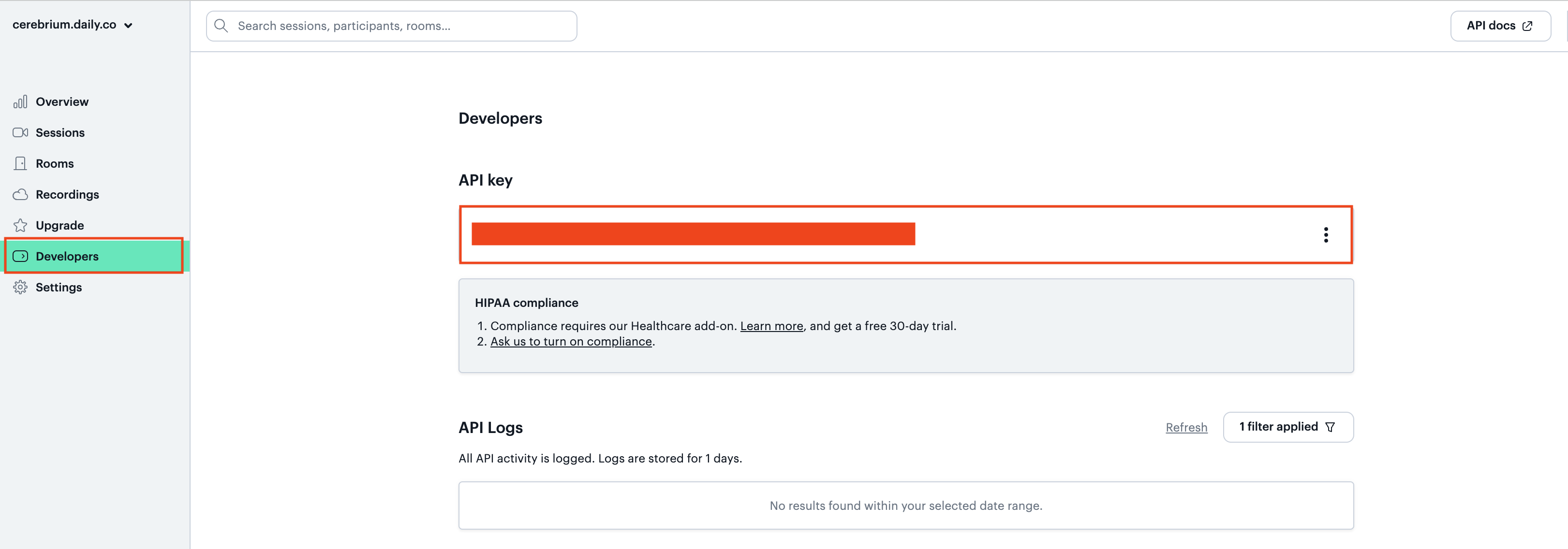
Get the Daily developer token from the profile page. Sign up here if needed (generous free tier available). Navigate to the “developers” tab for the API key and add it to Cerebrium Secrets. Daily API Key To test the voice bot locally, uncomment the main code at the bottom and run python main.py. The result is a fully functioning AI bot that interacts with users through speech in ~500ms. The next section creates a user interface for it.

Deploy to Cerebrium

Deploy to Cerebrium by running cerebrium deploy. The endpoints are used in the frontend interface below.

Connect frontend

A public fork of the PipeCat frontend demonstrates this application. Clone the repo here. Follow the instructions in the README.md and then populate the following variables in your .env.development.local
VITE_SERVER_URL=https://api.aws.us-east-1.cerebrium.ai/v4/p-xxxxx/<APP_NAME> #This is the base url of your pipecat-agent. Do not include the function names
VITE_SERVER_AUTH= #This is the JWT token you can get from the API Keys section of your Cerebrium Dashboard.
You can now run yarn dev and go to the URL: http://localhost:5173/ to test your application!

Conclusion

This tutorial provides a foundation for implementing voice in applications and extending into image and vision capabilities. PipeCat is an extensible, open-source framework for building voice-enabled apps. Cerebrium handles deployment and autoscaling with pay-as-you-go compute. Tag @cerebriumai to showcase work and join the Discord community for questions and feedback.